
There’s a pattern starting to emerge with teams adopting AI inside Snowflake and it’s actually a good one.
It usually starts the same way.
A few engineers get access to Cortex Code. They start experimenting. Someone builds something interesting. Others join in. Ideas start flowing. Use cases begin to take shape.
This is exactly what you want.
AI adoption should start with curiosity and experimentation. That’s where the real value gets discovered, not in a requirements document, but in hands-on exploration. But here’s where most organizations hit friction.
AI workloads behave differently than traditional data workloads. They’re exploratory by nature. People iterate, test, rerun, tweak prompts, try again. What feels like “light usage” at the individual level can scale into something very different at the platform level.
And then, quietly at first, the bill starts climbing.
Snowflake clearly understands this dynamic, which is why they introduced credit usage limits for Cortex Code. It’s a good feature. You should absolutely use it.
But if you stop there, you’re only solving half the problem.
The deeper issue isn’t just how much people can spend. It’s how they’re accessing the capability in the first place.
Cortex Code doesn’t live in a single, controlled entry point. It can be accessed through Snowsight, which is UI-driven and relatively observable, or through the CLI, which is far more flexible, and far more dangerous if left unmanaged.
The CLI is where things can get out of hand quickly. It’s built for speed and scale. It allows for scripting, automation, and repeated execution in ways that are hard to see and even harder to govern in real time. That’s great for mature, production-grade workflows. It’s not great when you’re still figuring out what “good” usage looks like.
Snowsight, on the other hand, introduces a bit of friction and that’s actually a good thing early on. It keeps interactions visible. It slows things down just enough to make usage more intentional. You can see what people are doing, understand patterns, and start connecting activity to value.
This is why, in practice, we recommend something that might feel counterintuitive at first:
Don’t just set limits. Control the path.
If you’re early in your Cortex Code adoption, the most effective move is to restrict CLI access using an authentication policy and force initial usage through Snowsight. Not permanently, but deliberately, at the beginning.
That gives you a contained environment where you can observe how people are actually using AI. You start to see which use cases matter, which ones don’t, and where costs begin to concentrate. You can adjust limits with context instead of guessing. You can scale access based on understanding, not optimism.
Without that step, what usually happens is predictable. Teams open everything up, usage grows in ways no one is tracking closely, and eventually finance steps in with questions. At that point, the response is almost always reactive: tightening controls, restricting access, slowing things down. And that’s where momentum gets lost.
It’s much easier to start controlled and expand than it is to pull things back after the fact.
This idea shows up in almost every Data & AI Strategy conversation we have. Organizations don’t struggle with enabling technology. They struggle with enabling it responsibly. And when that balance is off, trust erodes quickly especially when costs are involved.
Snowflake’s Cortex Code limits are a good starting point. They give you a way to cap exposure. But real governance comes from pairing those limits with intentional access patterns.
How to Actually Put Guardrails in Place
Snowflake gives you the mechanics—you just need to apply them intentionally.
At a high level, there are two things you should do right away:
- Set Cortex Code credit usage limits
- Control access (CLI vs Snowsight)
Let’s walk through both.
Setting Cortex Code Credit Limits
Snowflake allows you to define how many credits Cortex Code is allowed to consume before it stops executing.
You can follow the official documentation here:
https://docs.snowflake.com/en/user-guide/cortex-code/credit-usage-limit
In practice, this comes down to configuring a usage limit tied to Cortex Code so that:
- experimentation doesn’t spiral into uncontrolled cost
- usage has a clear ceiling
- teams are forced to be intentional

Start conservative. You can always raise limits later once you understand usage patterns.
Controlling Access: CLI vs Snowsight
This is the step most teams skip and where the real leverage is.
If you allow immediate CLI access, you’re effectively allowing:
- automation before understanding
- scale before governance
- cost before visibility
Instead, you can enforce access patterns using authentication policies in Snowflake.
The goal is simple:
- Restrict or disable CLI-based access initially
- Force users into Snowsight for early-stage usage
This keeps everything visible and easier to manage while you learn.
At a high level, this looks like:
- Defining an authentication policy that limits how users can connect
- Applying that policy to roles or users interacting with Cortex Code
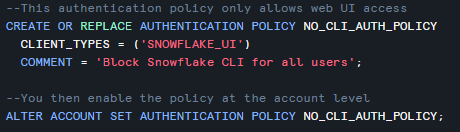
Now when a user attempts to use Snowflake CLI they receive the following:

Then later, once you understand usage, you can selectively open up CLI access for:
- approved workflows
- production use cases
- controlled automation
The Better Path Forward
When you combine both of these, credit limits and controlled access, you get something most organizations miss:
You get safe exploration.
People can still experiment.
They can still learn.
They can still build.
But they do it inside boundaries that protect the business.
And that changes everything.
Instead of reacting to cost overruns, you’re guiding adoption.
Instead of restricting innovation later, you’re enabling it responsibly from the start.
Final Thought
AI doesn’t break budgets.
Lack of control does.
Set the limits.
Control the access path.
Start constrained and then scale with intention.
That’s how you adopt AI without losing control of it.

